Construction Photo Documentation: How to Build a Reliable Visual Record of Site Progress
19 min read
Construction sites generate a lot of photographs. Engineers take pictures of reinforcement before a concrete pour, supervisors document defects, and contractors share updates as work moves from one stage to the next.
The problem usually isn't getting people to take photos. It's keeping those photos organised and making sure they're useful later.
A project manager might need to check the condition of a wall before plastering, find a picture of an installation that has since been covered, or confirm when a particular issue was first reported. But the image could be sitting in someone's phone gallery, buried in a WhatsApp conversation, or saved in a folder with dozens of other files.
Without the right information, even an important photograph can be difficult to use.
Construction photo documentation is about creating a visual record of what happened on site, when it happened, where it happened, and who recorded it. When photographs are captured and organised properly, they become a useful reference for tracking progress, reviewing site conditions, supporting inspections, and keeping project records complete.
Here's how construction teams can build a photo documentation process that works throughout the project, rather than leaving someone to sort through hundreds of images at the end.
What Is Construction Photo Documentation?
Construction photo documentation involves capturing, organising, and maintaining photographs of site conditions, construction activities, progress, inspections, and completed work.
It's different from simply taking pictures around a jobsite. Each image should have enough information behind it for someone else to understand what they're looking at, even if they weren't present when it was taken.
Take a photograph of electrical conduits installed on a concrete floor, for example. The image might be clear, but can someone looking at it three months later identify which project it belongs to, which floor it shows, or when the installation took place?
A useful photo record should ideally include:
Date and time: When the photograph was captured.
Location: The project, building, floor, zone, or specific work area.
Photographer: The person who took or uploaded the image.
Description: What the photograph shows and why it was taken.
Related records: Any inspection, daily report, task, or other project document connected to the image.
These details give photographs context and make them easier to understand and retrieve later.
Why Is Photo Documentation Important in Construction?
Photographs help construction teams keep track of work that might otherwise be difficult to remember or explain. They also give project managers a way to review site activities without having to be physically present every time something happens.
Here are some of the situations where a proper visual record makes a difference.
1. Keeping Track of Construction Progress
Written updates tell project managers what has been completed, but photographs show what the work actually looks like.
A series of photographs taken over several weeks can show how excavation has progressed, which structural elements have been completed, and how much finishing work remains.
This is particularly helpful for managers overseeing multiple projects. Instead of relying entirely on verbal updates, they can review photographs from the site and compare them with earlier records.
Of course, photographs shouldn't replace progress measurements or programme updates. They work best alongside those records, giving the team a clearer picture of what's happening.
2. Recording Existing Site Conditions
Before construction starts, it's worth documenting the condition of the site and its surroundings.
This might include neighbouring buildings, access roads, existing cracks, boundary walls, underground services, or other features that could be affected by the work.
Consider a contractor preparing for excavation next to an existing property. If photographs of the neighbouring wall are taken before work begins, the team has a useful reference if a crack or other damage is reported later.
Without those initial records, it can be much harder to establish what the area looked like before construction started.
3. Photographing Work Before It Gets Covered
Some construction activities are difficult, or sometimes impossible, to inspect visually once the next stage of work begins.
Reinforcement gets covered by concrete. Electrical conduits disappear behind walls. Waterproofing membranes are hidden beneath protective layers and finishes.
If nobody photographs these installations at the right time, the team may have little visual information to refer to later.
That's why concealed work deserves particular attention. Photographs taken before the next stage begins can help document what was installed and the condition it was in at that point.
4. Supporting Inspections and Quality Control
Photographs are useful when an engineer identifies a defect or finds that work doesn't meet the required specifications.
For example, if a pipe connection is incorrectly installed, the engineer can photograph the affected area, describe the issue, and connect the image with the relevant inspection record.
Once the corrective work is complete, another photograph can show the updated condition.
This gives the team a visual reference for what was found and what was done about it. The photographs support the inspection process, although they don't replace technical checks, test results, or formal approvals.
5. Keeping Records for Disputes and Handover
Questions about site conditions and completed work don't always come up while construction is underway. Sometimes they appear months later, during handover or after a disagreement between project parties.
A photograph taken at the right time can help clarify what was happening on site. When it's supported by a date, location, description, and related reports, it's much easier to understand in context.
AACE International addresses this subject in its Recommended Practice 95R-18, Construction Photography to Document Project Status. Its guidance covers the planning, capture, organisation, retrieval, and use of construction photographs as part of project-status documentation.
Read AACE International's guidance on construction photography.
What Makes a Construction Photo a Reliable Project Record?
A photograph can show a lot, but it doesn't always tell the whole story.
Someone reviewing an image later needs to know more than what appears in the frame. They should be able to establish when it was captured, where it belongs, and who recorded it.
Four details are particularly useful.
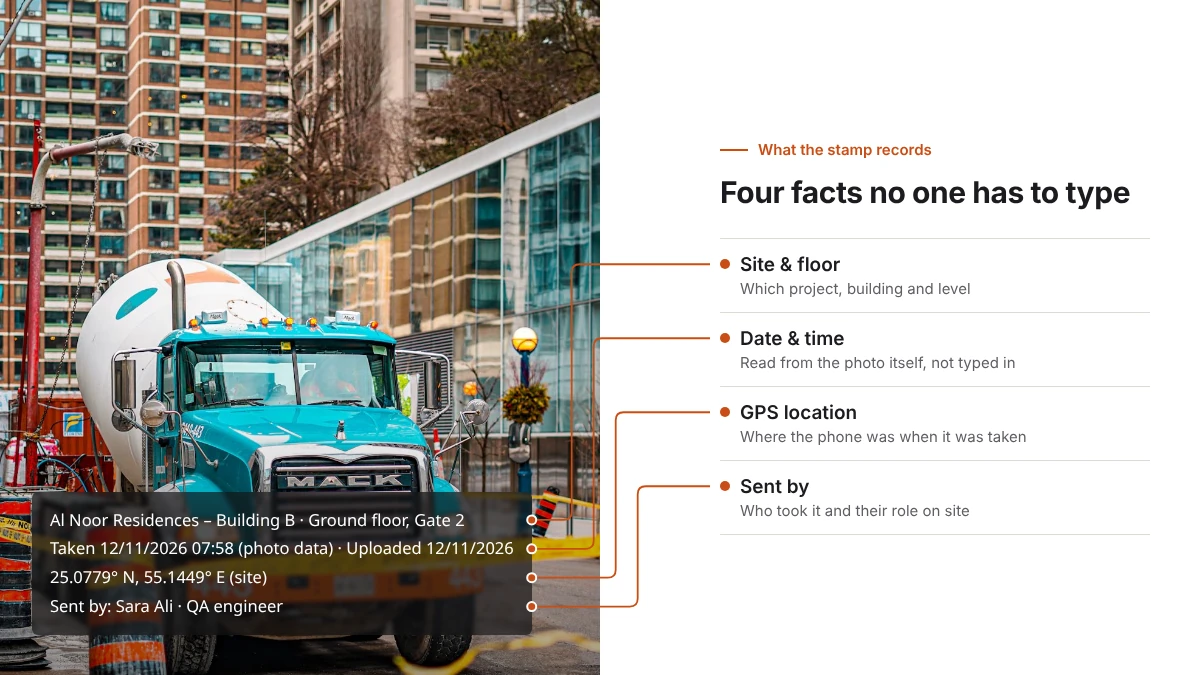
1. Date and Time: When Was the Photo Taken?
A timestamp places a photograph within the project's timeline.
Imagine a contractor reporting that ceiling installation was completed before an inspection. The project manager may need to review photographs to understand the condition of the work around that time.
Without a date and time reference, finding the relevant image becomes more difficult.
It's better to have this information recorded as part of the photo workflow rather than relying on workers to remember to write it down or rename every file manually.
2. GPS Coordinates: Where Was the Photo Taken?
Location becomes especially important on larger construction projects.
A photograph of completed concrete work might look much like dozens of other images taken around the same site. Without location information, someone reviewing it later may have no easy way to identify the exact work area.
GPS coordinates help associate a photograph with the physical location where it was captured.
This can be useful on multi-building developments, road projects, utility installations, and other sites where several activities happen across different areas at once.
GPS isn't always precise enough to identify an individual room or installation, particularly indoors. For that reason, it's still worth recording building, floor, grid, or zone details where needed.
3. Photographer Identity: Who Took the Photo?
Knowing who captured a photograph can save time when someone needs more information.
For instance, a project manager might find an image showing a damaged pipe connection but need to know when the issue was first noticed or what happened before the photograph was taken.
If the image is associated with the photographer's name, the manager has someone to contact.
This also makes it easier to keep track of documentation responsibilities across the site team. Engineers, supervisors, inspectors, and subcontractors may all contribute photographs, but their contributions shouldn't become anonymous once the images are uploaded.
4. Description and Work Context: What Does the Photo Show?
Even a timestamped, location-tagged photograph can be difficult to interpret if there's no explanation attached.
A picture of reinforcement, for example, doesn't necessarily tell someone whether it was taken during installation, before an inspection, or immediately before a concrete pour.
A short description can clear that up.
Some useful examples include:
Reinforcement inspection before slab concrete pour.
Waterproofing membrane installed on basement wall.
Electrical conduits completed on Level 3.
Damaged pipe connection identified during inspection.
Corrective work completed on the north-side wall.
Descriptions don't need to be lengthy. They just need to give the next person enough context to understand why the image matters.
What Should Construction Teams Photograph During a Project?
Not every activity needs the same level of documentation. The project team should decide which stages, installations, and site conditions need to be photographed, based on the nature of the work and the project's requirements.
The following checklist is a useful starting point.
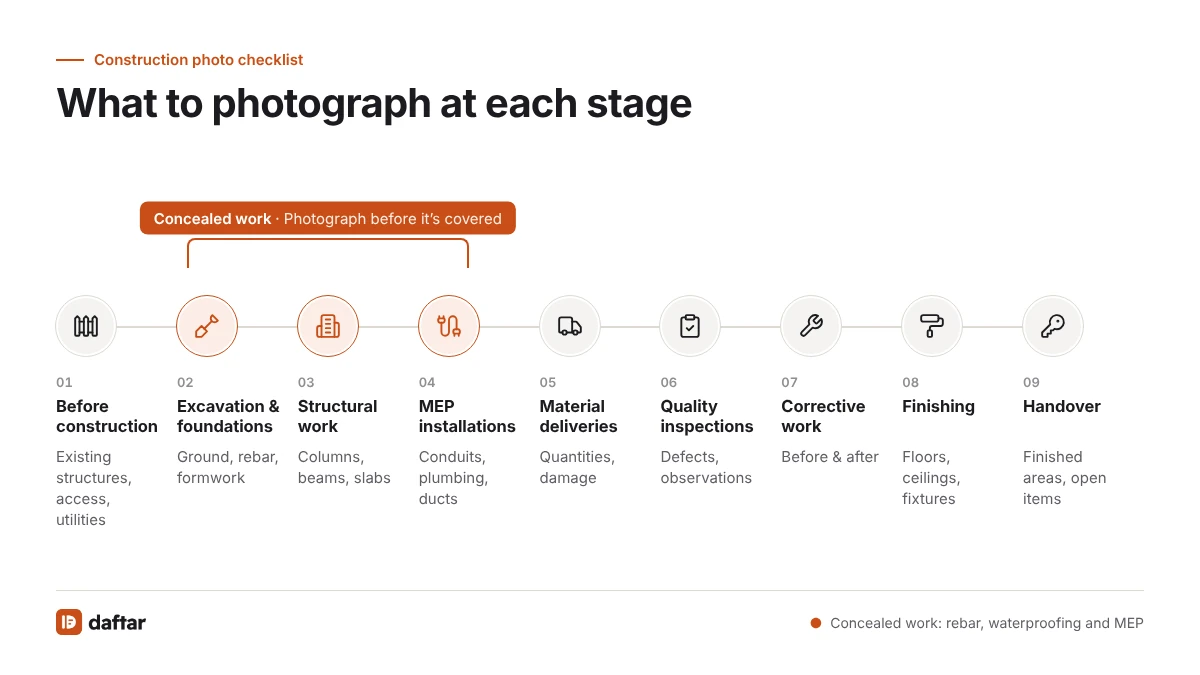
Construction stage | What to photograph |
Before construction | Existing structures, surrounding conditions, access routes and utilities |
Excavation and foundations | Ground conditions, excavation, reinforcement and formwork |
Structural work | Columns, beams, slabs, reinforcement and concrete placement |
MEP installations | Electrical conduits, plumbing, HVAC ductwork and concealed services |
Material deliveries | Delivered materials, quantities, packaging and visible damage |
Quality inspections | Defects, incomplete installations and inspection observations |
Corrective work | Before-and-after photographs of repairs and completed snags |
Finishing | Flooring, ceilings, painting, fixtures and completed areas |
Handover | Finished spaces, installed equipment and outstanding items |
Don't Miss the Work That Will Be Concealed
This deserves a little extra attention because it's easy to overlook when teams are busy moving from one activity to the next.
Before concrete is poured, for example, the engineer may need photographs of the reinforcement arrangement, embedded services, and other relevant details.
The same applies to waterproofing applications and underground utility installations. Once these are covered, getting another photograph of the original condition may not be possible without reopening the work.
Make these photographs part of the inspection process. Capture them at the appropriate stage and keep them with the relevant inspection records.
How to Take Construction Progress Photos That Are Actually Useful
You don't need professional photography equipment to create useful site records. A phone camera is often enough. What matters is knowing what to capture and making sure the important details aren't missed.
A few consistent habits can improve the quality of photographs across the entire team.
Capture Wide, Medium, and Close-Up Views
Try not to rely on a single photograph to explain an entire construction activity.
A wide shot shows the overall work area. A medium shot gives a better view of the installation, while a close-up captures details that might otherwise be difficult to see.
Take reinforcement before a concrete pour as an example. Start with a photograph showing the overall slab area, then capture closer views of reinforcement spacing, connections, and other details that need to be documented.
Together, these images give the reviewer a much clearer understanding of the work.
Use Consistent Photographing Positions
When documenting the same area over several weeks, try to take photographs from similar positions.
A picture taken from the same corner of a building each week makes it easier to compare progress. Changes become more obvious when the angle and viewpoint remain consistent.
For larger projects, teams can establish fixed photo points or mark preferred viewpoints on site plans.
Photograph Work at the Right Time
Timing matters, particularly when an activity is about to be covered, or another stage is about to begin.
A useful construction site documentation schedule might include:
Before work starts.
During significant construction activities.
Before concealed work is covered.
During inspections.
After corrective work is completed.
At major project milestones.
The exact frequency will depend on the project, but it's worth agreeing on these points before work gets underway.
Don't Photograph Everything Just for the Sake of It
More photographs don't necessarily mean better documentation.
Taking twenty nearly identical pictures of the same installation creates more files to manage without adding much useful information.
Focus on photographs that show meaningful progress, an important condition, a completed activity, or something that needs attention.
The American Institute of Architects also recommends documenting significant progress and specific deviations during site evaluations, rather than taking photographs without a clear purpose.
Read the AIA's guidance on using photography to evaluate on-site work.
How to Organise and Manage Construction Photos
This is where many construction teams run into trouble.
Photos are taken throughout the day, shared between team members, and sometimes downloaded onto office computers. Over time, the same project can end up with several disconnected collections of images.
A few straightforward practices can prevent that from happening.
Organise Photos by Project and Location
Avoid keeping every photograph in one general folder.
A simple structure could look like this:
Project Alpha
Building A
Level 1
Level 2
Level 3
Building B
Level 1
Level 2
External Works
Inspections
Handover
This makes it easier for someone in the office to find photographs of a particular building or floor without opening every file.
Use Consistent File Names
If your team manages photographs through a traditional file system, agree on a naming format that everyone can follow.
For example:
ProjectA_2026-11-17_BuildingA_Level3_Reinforcement_01.jpg
The name identifies the project, date, location, activity, and photograph sequence.
It may seem like a small detail, but consistent naming makes a difference when a project has been running for months, and the number of photographs keeps growing.
Keep Original Photographs
Sometimes an image needs to be cropped, annotated, or marked up for a presentation or report.
That's fine, but keep the original photograph as well.
Having both versions makes it easier to distinguish the original record from an image that has been modified for explanation. It also helps maintain a clearer documentation history.
Set Up Access and Backup Procedures
Not every person involved in a project needs access to every photograph.
Decide who can upload, view, download, and manage project images. Access should reflect people's responsibilities and the project's information-sharing requirements.
Backups matter too. Site photographs may be needed long after construction is finished, so they shouldn't depend on a single phone or computer remaining available.
How to Connect Construction Photos With Daily Site Reports
A photograph is useful on its own, but it becomes much more meaningful when there's a written account of the activity behind it.
Daily site reports provide a natural place to connect photographs with the work completed during a particular shift.
Consider a report covering concrete work on a commercial building. It might include:
The building and section where work took place.
The activities completed during the shift.
The teams on site and how many people worked.
Relevant inspection observations.
Any delays or interruptions.
Photographs showing the actual work.
When images are attached to the relevant report, the person reviewing it doesn't have to search through separate folders to understand what happened.
They can read the description, look at the photographs, and review the day's activities together.
This is particularly helpful when someone needs to revisit an earlier stage of work or prepare documentation for a handover.
For more on this, read our guide on how daily site reports protect project managers from disputes, delays, and cost overruns.
How Digital Tools Make Construction Photo Documentation Easier
Many site teams still use personal phone galleries, WhatsApp groups, and shared folders to manage construction photographs.
These tools are convenient for quick communication. The trouble starts when a project manager needs to turn all those images into a proper project record.
A supervisor might share an important photograph in a busy group conversation. Someone downloads it, another person forwards it, and the office saves a copy in a folder. A few weeks later, finding the original image or confirming its context can take longer than it should.
A digital construction workflow can bring these activities together.
daftar is built around this idea. It connects site photographs with location information, team communication, reports, and project documents, so workers don't have to manage each part separately.
Here's how that works in practice.
Photo Records With Time, Location, and Photographer Details
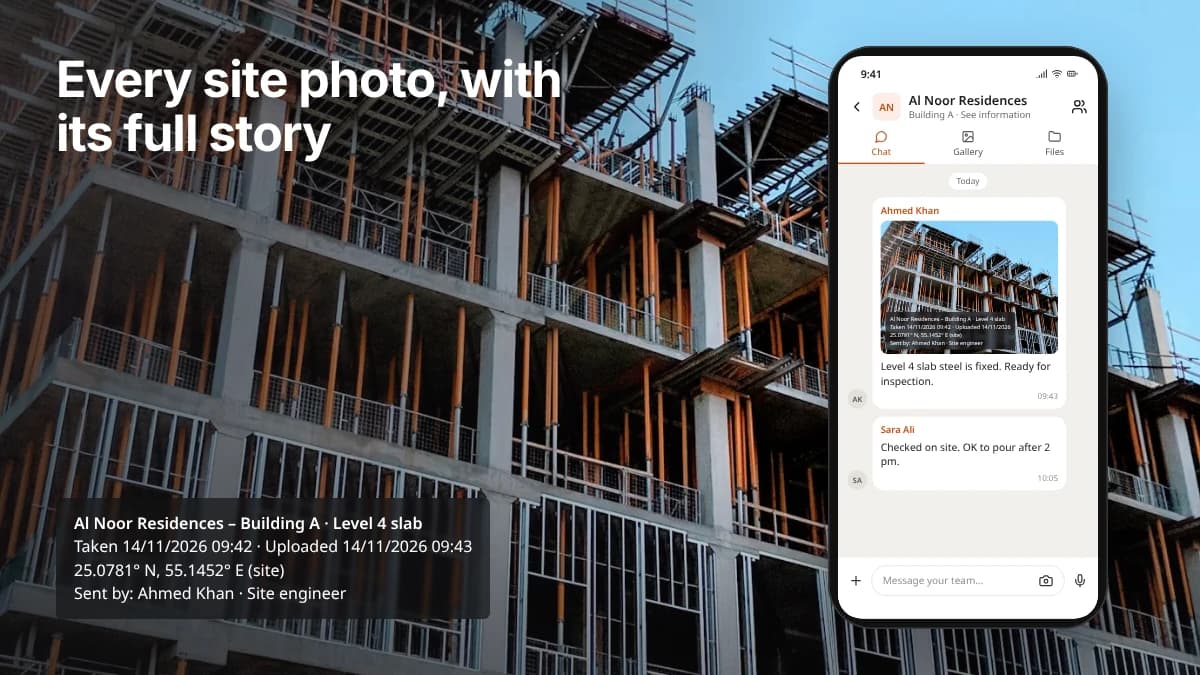
When photographs are uploaded through daftar, the photo record includes the site, floor, date, time, GPS location, and the name of the person who sent it.
That information is especially useful when several people are documenting different activities across the same project.
Instead of depending entirely on someone to add these details later, the team has them associated with the photo record.
Find Site Photos by Location
On a busy project, remembering which building or work area a photograph belongs to can be difficult.
daftar's Maps feature displays photographs on the map and in the relevant site gallery. Project managers can open a jobsite and review its associated photographs rather than searching through separate phone galleries or old conversations.
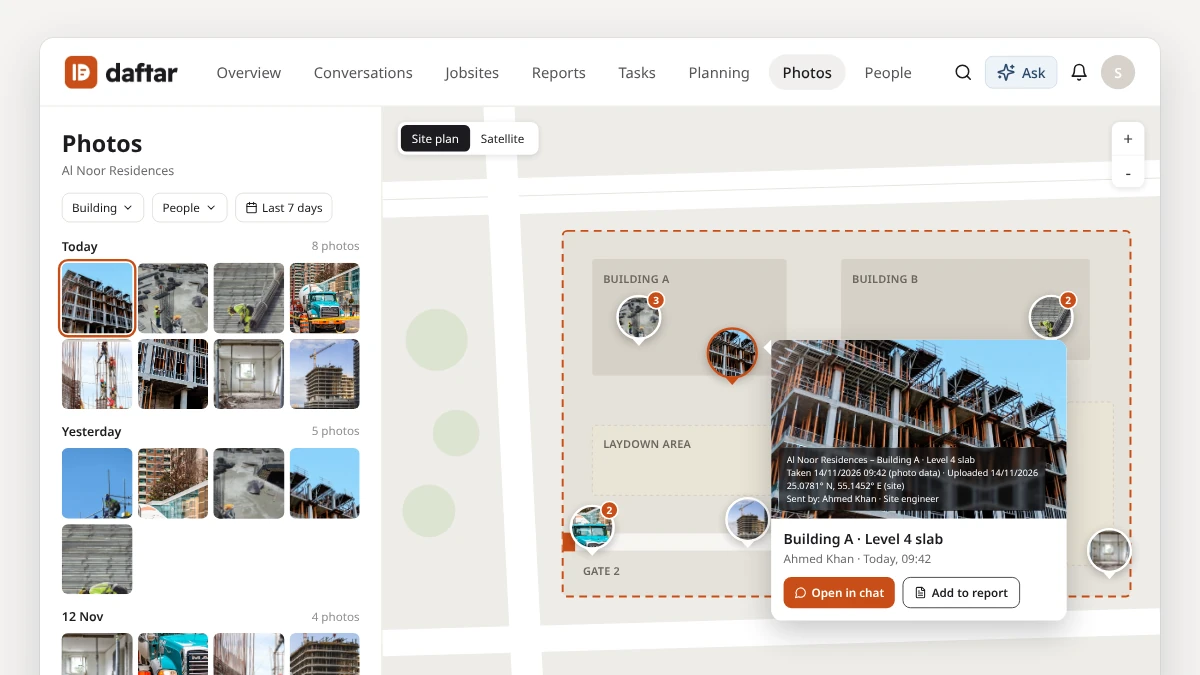
This is particularly helpful for contractors managing several jobsites or projects spread across larger areas.
Explore daftar's construction site mapping and photo tracking.
Keep Photos With Project Documents
Photographs shouldn't be disconnected from drawings, permits, reports, and other project information.
daftar's Files feature organises photographs and documents under their relevant sites. Photos are sorted by date and location, making it easier for teams to find earlier records when reviewing an activity or preparing project documentation.
Learn more about construction document and photo management with daftar.
Connect Photographs With Reports and Site Tasks
A photograph showing a defect or incomplete activity should lead to some form of follow-up.
daftar allows teams to add photographs to digital reports, complete forms from the site, collect signatures, and generate PDFs on company letterhead.
For outstanding work, teams can also use drawing-based tasks to pin an issue to a specific location, assign responsibility, set a due date, and add a photograph once the work is completed.
Explore daftar's digital construction reporting and drawing-based task and snag management.
The real benefit is that photographs become part of the team's regular site workflow. Workers capture them as part of their daily activities, and the information remains connected to the project rather than becoming another collection of files someone has to organise later.
Common Construction Photo Documentation Mistakes to Avoid
Even teams that take photographs regularly can end up with incomplete or difficult-to-use records.
Some problems are easy to prevent once everyone understands what a useful photo record should contain.
Taking photographs without recording their location. An image might show completed work, but the person reviewing it has no idea which building, floor, or section it belongs to.
Relying on personal phone galleries. Important photographs remain with individual workers instead of becoming accessible to the wider project team.
Uploading images without descriptions. The photograph is available, but there's no explanation of what activity or condition it represents.
Photographing concealed work too late. Once an installation is covered, the team may lose the opportunity to document its original condition.
Sharing compressed images without preserving originals. Repeated forwarding can reduce image quality and make it harder to identify the original record.
Keeping photographs separate from reports. Images and written observations end up in different places, making it harder to understand the full picture.
Ignoring privacy and access requirements. Site photographs can include workers, visitors, neighbouring properties, or sensitive project information. Teams should follow relevant privacy requirements and project procedures.
Most of these problems don't require a complicated solution. They require a consistent process and a clear understanding of what information should accompany each photograph.
Frequently Asked Questions
What is construction photo documentation?
Construction photo documentation is the process of capturing and maintaining photographs of site conditions, construction activities, progress, inspections, and completed work. Useful records include details such as the date, location, photographer, and a description of what the photograph shows.
How often should construction progress photos be taken?
It depends on the project size, construction stage, reporting requirements, and contractual obligations. Some activities benefit from daily photographs, while others need to be documented at specific milestones, inspections, or before work becomes concealed.
What information should a construction photo record include?
Ideally, it should include the project name, date, time, location, photographer's name, and a short description. Where relevant, the photograph should also be connected to the related inspection, daily report, drawing, or task.
Why are timestamps important in construction photographs?
Timestamps help establish when a photograph was captured and place it within the project's timeline. This makes it easier to compare progress, review site conditions, and find photographs associated with a particular activity.
How do GPS coordinates help with construction photo documentation?
GPS coordinates associate a photograph with its physical location. They're particularly useful on large construction sites, infrastructure projects, and multi-building developments where identifying the exact work area can otherwise be difficult.
Who should be responsible for taking construction progress photos?
Responsibility usually depends on the project and the activity being documented. Site engineers, supervisors, inspectors, and subcontractors may all contribute. It's important to establish who is responsible for documenting specific activities so that important stages aren't missed.
Can construction photographs be used as evidence in disputes?
Photographs can support project records and help explain site conditions, completed work, delays, and defects. Their evidential value depends on authenticity, context, accuracy, documentation procedures, and applicable contractual and legal requirements. They should be retained alongside relevant reports, correspondence, and inspection records.
How can construction teams organise site photographs?
Teams can organise photographs by project, building, floor, location, date, and activity. Consistent descriptions, original image retention, and a central project documentation system make it much easier to retrieve images later.
Can construction photos be automatically timestamped and location-tagged?
Yes. Some construction management applications associate uploaded photographs with details such as the date, time, and location. daftar also associates photo records with the relevant site, floor, and sender, helping teams avoid adding all this information manually.
Build a Visual Record That Stays With the Project
Construction photographs are easy to take. Keeping them organised, understandable, and accessible is where the real work begins.
A picture of completed reinforcement or a newly installed pipe may seem straightforward today. But months later, someone might need to know exactly where it was taken, when it was recorded, or who captured it.
That's why a good photo documentation process matters. It gives every image a place in the project's history and makes it easier for the team to refer back to earlier work when questions arise.
Keep Every Site Photo Connected to the Work
Don't let important construction photos get lost in phone galleries or scattered WhatsApp chats. With daftar, capture site photos, keep them organised by location and date, and connect them to reports, tasks, and project records.